
If you want to run a Vice/TCPser setup on windows to simply dial telnet BBS’s, here is what you will need:
1) Vice 3.8 Vice 3.8 x64 for Windows
2) Tcpser TCPser v1.1.4 Beta
3) CCGMS Future Terminal CCGMS Future Terminal
5) Extract all of these files. Go inside the tecpser folder, edit the run2400 batch file inside of the tcpser folder. For some reason you will see the baud rate is set to 1200, change it to 2400 and save it. When you run the 2400 batch file, it should open a CMD window and keep running. Next, go into Vice and the bin folder. Run x64sc. You will need to go into Preferences > Settings > Peripheral devices > RS232. Make sure ACIA is NOT enabled. Enable userport RS232 emulation. Change the device dropdown to serial 3 and baud 2400. Below in serial 3, it should already be 127.0.0.1:25232, if not change it. Also set it to 2400 baud with IP232 enabled.
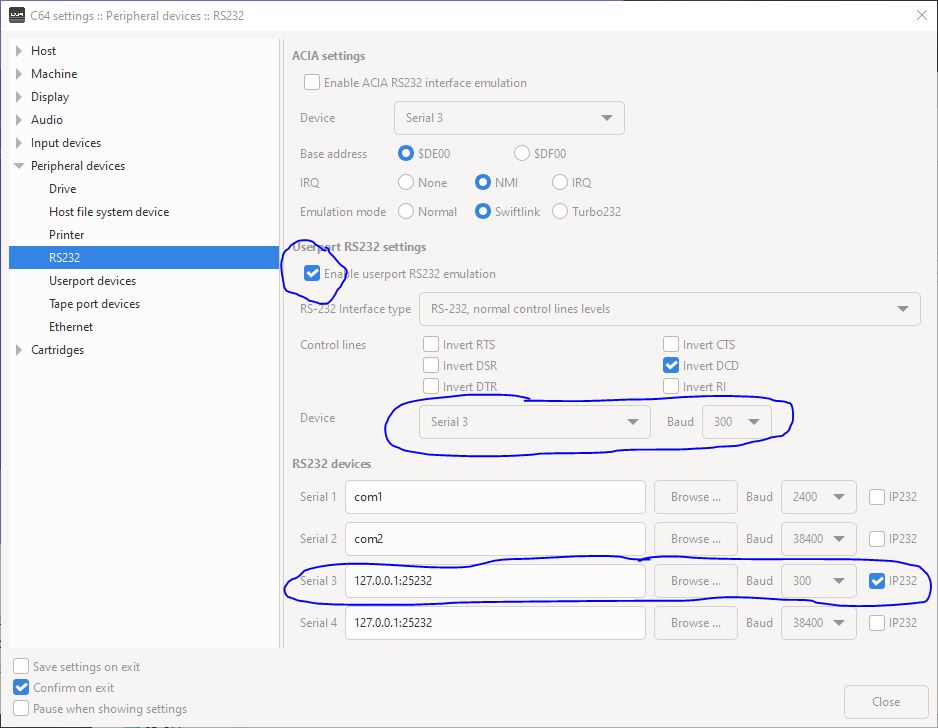
You should see the settings in the picture, except ignore the 300 baud which should instead be set to 2400.
6) Check DRIVE that Drive 8 is set to either 1541 or 1541-II. Close out of the settings menu. Go into File > Attach Disk Image #8 and select the ccgms-future.d64 disk image.
7) Now load and run ccgms/future (ie: load “ccgms/future”,8,1 and then RUN after loading is done.
8) If everything is setup correctly, in the terminal screen you should be able to type AT